
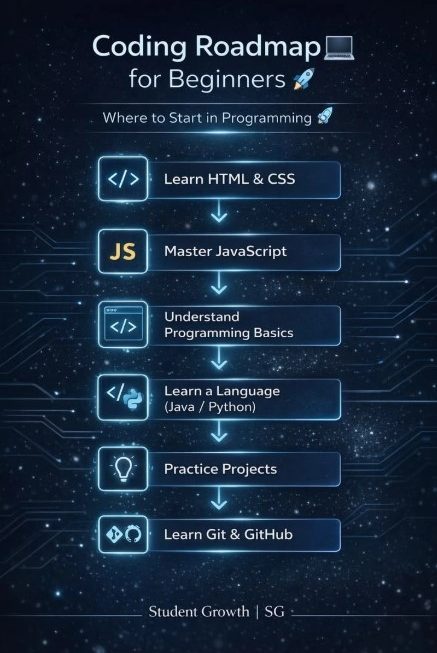
Learning to code in 2026 is more accessible than ever, thanks to abundant free resources, interactive platforms, and AI-assisted tools that accelerate understanding. Whether you aim for a career change, want to build personal projects, or simply develop problem-solving skills, a structured roadmap prevents overwhelm and ensures steady progress. This beginner-friendly guide outlines a clear, realistic path from zero knowledge to building functional applications.
The journey typically takes 6–12 months of consistent effort (10–15 hours per week) to reach junior-level readiness, though timelines vary based on dedication and goals. Focus on one step at a time, practice daily, and prioritize building projects over passive learning.
Step 1: Define Your Goals and Mindset
Start by clarifying why you want to learn coding. Do you want to create websites, analyze data, build mobile apps, or automate tasks? Clear goals keep you motivated and help choose the right starting language.
Adopt a growth mindset: expect challenges, embrace mistakes as learning opportunities, and celebrate small wins. Avoid “tutorial hell” by applying concepts immediately through coding exercises. Consistency beats intensity—short daily sessions yield better results than sporadic marathons.
Step 2: Choose Your First Programming Language
For most beginners, start with either Python or JavaScript:
- Python: Ideal for beginners due to its simple, readable syntax. Great for data science, automation, AI, and backend development.
- JavaScript: Best if you’re interested in web development, as it powers interactive websites alongside HTML and CSS.
Many recommend starting with web fundamentals (HTML, CSS, JavaScript) for quick visible results that boost motivation. Python suits those preferring logic and problem-solving without immediate visual focus. Pick one and commit for at least 4–8 weeks before exploring others.
Step 3: Master the Fundamentals (Weeks 1–4)
Focus on core concepts that apply across languages:
- Variables, data types, and operators
- Control structures (if-else, loops)
- Functions and modular code
- Basic input/output
- Simple problem-solving exercises
Use free interactive platforms like freeCodeCamp, Codecademy, or Scrimba for hands-on practice. Dedicate time to typing code manually rather than copying. Solve daily challenges on LeetCode (easy problems) or HackerRank to build logic.
Step 4: Build Web Foundations (If Choosing Web Path)
Learn HTML for structure, CSS for styling (including Flexbox and Grid for responsive layouts), and JavaScript for interactivity. Create simple projects like a personal portfolio, to-do list app, or interactive quiz. These visible results reinforce learning and form the basis of your portfolio.
Step 5: Learn Version Control and Tools (Weeks 5–8)
Master Git and GitHub early. Learn how to track changes, create branches, and collaborate. Set up a professional development environment with VS Code. This step prepares you for real-world workflows and makes sharing projects easy.
Step 6: Dive Deeper and Build Projects (Months 2–4)
Apply fundamentals by building increasingly complex projects:
- Beginner: Calculator, weather app, or blog page
- Intermediate: Full-stack application with user authentication, database (like MongoDB or SQLite), and deployment on Netlify or Vercel
Projects teach debugging, problem decomposition, and integration of multiple concepts. Document your code with clear comments and create detailed README files on GitHub.
Step 7: Explore Frameworks and Specializations (Months 4–6)
Once comfortable with basics:
- Front-end: React or Vue.js
- Back-end: Node.js/Express or Python with Django/Flask
- Additional skills: Databases (SQL), APIs, basic testing, and responsive design
Choose a specialization based on your goals—web development remains highly practical for beginners. Use AI tools like GitHub Copilot responsibly to explain concepts and suggest improvements, but always understand the underlying code.
Step 8: Build a Portfolio and Gain Experience
Create 5–8 quality projects showcasing different skills. Host them online and write case studies explaining your approach and challenges overcome. Contribute to open-source projects, participate in hackathons, or freelance small gigs to build real experience.
Network on LinkedIn, join communities like Reddit’s r/learnprogramming, and share your learning journey. This visibility often leads to opportunities.
Step 9: Continuous Learning and Job Preparation
Technology evolves quickly. Dedicate time weekly to new tools and best practices. Prepare for interviews by practicing algorithms, system design questions, and portfolio walkthroughs. Entry-level roles value demonstrated skills and problem-solving ability more than formal degrees.
Essential Resources
- Free: freeCodeCamp (full certifications), The Odin Project, MDN Web Docs
- Interactive: Scrimba, Codecademy
- Practice: LeetCode, Codewars
- Communities: Stack Overflow, Discord coding servers
Common Challenges and Solutions
- Feeling overwhelmed: Break learning into small daily tasks and focus on one concept at a time.
- Lack of motivation: Join accountability groups or tie coding to personal interests.
- Debugging frustration: Use AI assistants and online forums—persistence builds resilience.
Track progress with a journal or Notion dashboard. Take breaks to avoid burnout.
Realistic Expectations
With consistent effort, you can build basic applications within 3 months and reach job-ready status in 6–12 months. Results depend on daily practice rather than total hours. Many successful developers started exactly where you are—curious and determined.
Learning to code is a transformative skill that opens doors to creativity, problem-solving, and exciting career opportunities. Follow this roadmap patiently, build regularly, and stay curious. Your first working program will mark the beginning of an empowering journey. Start today with just 30 minutes of focused learning, and take one step at a time. The world of coding awaits—your future self will thank you for beginning.
Read more – updateprnews.com
